If you’re not seeing the full value you hoped for, chances are you’re not leveraging all our platform can do. Before you lose access to all the business growth opportunities that Semrush offers, we would love to show you the alternative options that might benefit you better:
- Request a demo, and see what Semrush can do for you.
- If you’re having a platform issue, please let us know.
- If you have unanswered questions, we can help.
How do I cancel my subscription or trial?
There are two ways to cancel:
- Direct link to Cancellation Form: Complete the form at this link, and confirm your decision to unsubscribe. After submitting the form, you’ll receive a cancellation confirmation email with a confirmation link (please note: the confirmation link is valid for 24 hours). You must click this link to finalize your request. Only then will a case be created for our Customer Support team, and once they process your submission, you’ll receive an email shortly confirming the cancellation is complete.
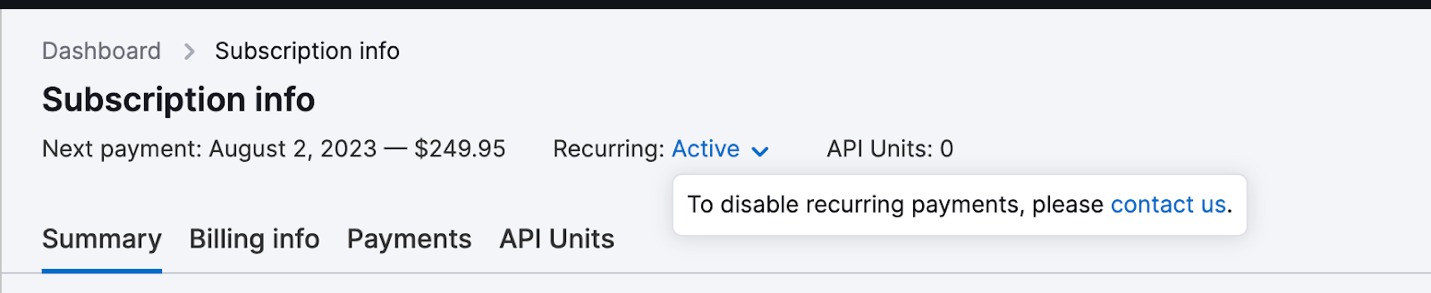
- Via Subscription Info Page: Log in to your account, and navigate to your Subscription Info page. Find the link that says Active next to Recurring, and follow the Contact us link to the cancellation form.
What happens if I cancel my subscription?
Why not book a demo? We can all but guarantee there are other ways to get the most out of Semrush.
If you have a Business, Pro or Guru subscription to any of our toolkits, you can simply downgrade your plan. This can help you to save money, while still accessing reduced Semrush capabilities—and you can easily scale back up when it makes sense. We’ll even keep your Website monitoring data saved for 30 days, just in case you change your mind.
How do I downgrade my account?
To downgrade to another pricing plan, simply contact Support, and we’ll take care of it. If you decide to re-upgrade, we’ll save your Website monitoring data for 30 days. If you downgrade to a free plan, we will keep your data for one month. After that, however, all your data will be deleted—except for the Website monitoring data in your oldest folder.
How do I remove additional limits/add-ons?
To remove additional limits or add-ons from your subscription, follow this link. Fill in the form stating what limits you want to remove, and press the Submit button. Our customer service will then contact you shortly.
How do I remove a toolkit from my account?
If you’d like to remove a specific toolkit (SEO, Content, Local, etc.) from your account, follow this link. Select the toolkit you no longer need and confirm. Our team will follow up with you shortly.
How do I cancel if I can’t log into my account?
Please contact our Support team if you can’t log in to your account and need to cancel.
When contacting us via email, please use the email address associated with your account and include the following data:
- The email address associated with your paid account or account with a free trial.
- The last four digits of the credit card number you use for payments, and the type of credit card used (NB: Please keep your data secure and don’t provide us with the entire credit card number).
- The billing amount and date of your last payment.
This data will help us quickly identify your Semrush account and modify your subscription.
How do refunds work and who is eligible?
Who is eligible for a refund?
Semrush offers a one-time, 7-day money-back guarantee for eligible purchases made directly on Semrush.com using a credit card.
You may be eligible if all of the following apply:
- You purchased directly from Semrush.com using a credit card.
- Your refund request is for either:
- your initial subscription or Toolkit purchase with a commitment of 12 months or longer, or
- your initial purchase of an add-on for an existing subscription.
- You submit a written refund request within 7 calendar days of the eligible purchase.
Month-to-month subscriptions are not eligible for the standard 7-day money-back guarantee.
If you have a signed agreement with Semrush, the standard online refund policy does not apply. Please refer to the cancellation and refund terms in your signed agreement.
What counts as an add-on
Toolkits are treated as standalone subscriptions, not add-ons. This includes Semrush One, SEO Toolkit, AI Visibility Toolkit, Content Toolkit, Local Toolkit, Traffic & Market Toolkit, and other Semrush Toolkits. Purchasing an additional Toolkit on top of an existing subscription does not make that Toolkit an add-on for refund purposes.
Add-ons are additional features, tools, or limits purchased on top of an existing subscription. Common examples of add-ons include additional users, keyword limits, PDF reports, API units, and apps, among others. An eligible initial add-on purchase may qualify for the 7-day money-back guarantee.
Are subscription renewals refundable?
The standard 7-day money-back guarantee applies to eligible initial purchases, not subscription renewals.
Canceling during your current subscription term does not entitle you to a refund of prepaid or committed fees. You can cancel before your next renewal to prevent future renewal charges.
Does canceling automatically request a refund?
No, canceling your subscription does not automatically result in a refund. To receive a refund, you must be eligible under our Cancellation and Refund Policy and explicitly request a refund.
If you want both to cancel your subscription and receive a refund, you must explicitly state that you are requesting a refund in the additional comments field of the Cancellation Form.
Canceling without asking for a refund does not automatically make the payment refundable.
How do I request a refund?
Submit your written refund request within the applicable 7-day period using either of these options:
- Cancellation Form: If you're canceling your subscription at the same time, explicitly state that you are requesting a refund in the additional comments field.
- Contact Form: You can request a refund directly through our Contact Form. Contact our Support team using the email address associated with the Semrush account where the purchase was made, and include your account details so we can identify the purchase.
Semrush Support may ask you to provide additional information to verify your account or payment, such as transaction details, the billing date, or the last four digits of the card used.
For your security, never send your full credit card number.
When will I receive my refund?
If your refund request is approved, Semrush will process the refund within 30 calendar days after receiving your written request and any reasonably requested information.
The refund is sent through the same payment method used for the original purchase. Your bank or payment provider may charge fees, including currency-conversion fees; these charges are not covered by Semrush.
Where can I check my refund status?
You can check whether your refund has been processed in Subscription info → Payments.
Find the relevant payment and check the Status column. Once the refund has been processed, its status will appear as Refunded.

What if I canceled but was still charged?
If you believe you canceled before a charge but were billed anyway, contact our Support team using the email address associated with the Semrush account where the purchase was made, and provide:
- when you submitted your cancellation request, and
- when the charge occurred.
We'll review the cancellation and billing history and let you know whether the charge qualifies for a refund.
What if my situation doesn't match these conditions?
If you believe a charge was applied incorrectly or there was an issue with your cancellation or billing, contact our Support team so we can review your case.
For the complete terms and conditions governing refunds, see the Semrush Cancellation and Refund Policy.
How do I delete my account?
To delete your account, log in to your account first, then submit a request to our Support team through this link, as described in our Terms of Service (Section 7.4 — De-Registration).
What happens next?
- After submitting your request via this link, you’ll receive a confirmation email with an account removal activation link.
- Click the account removal activation link to confirm that you want to delete your account.
- This step helps us verify that the request was made by you.
- The activation link is valid for 72 hours.
When will my account be deleted?
Once you confirm the deletion request—and provided we have no other obligations to retain your data—your account will be permanently deleted within 30 days.
Didn’t receive the confirmation email?
If you don’t see the email in your inbox, please check your spam or junk folder.